
Field v0.2.1: 9,378 Lines setting up the future
Check the new version here:
I have been a bit quiet recently, but not because nothing was happening. Quite the opposite.
This update touches 9,378 lines of code. It rewrites the whole engine surface of Ludic Field. From the outside, it will look like a very modest release. No shiny new buttons. No new toy for your players.
So why did I sink so many hours into something that seems invisible?
Because this is the update that turns Ludic Field from “a prototype that works most of the time” into “an actual engine we can build wild stuff on.”
TL;DR
- Fewer visual glitches, more stable transitions, and small quality of life fixes.
- Theme settings can now be customized per map, so you do not get nuclear fireballs when you try colors.
- The engine is now built on a clean architecture with modern TypeScript, a new camera system, and a proper mode manager.
- This unlocks what comes next: complete airshafts, smart navigation, remote GM control, grids that actually mean something for gameplay, and richer interactivity.
If you like the behind-the-scenes details, read on. If not, you still get a better and more reliable Field right now.
1. What you might actually notice today
Tomokazu colony map preview
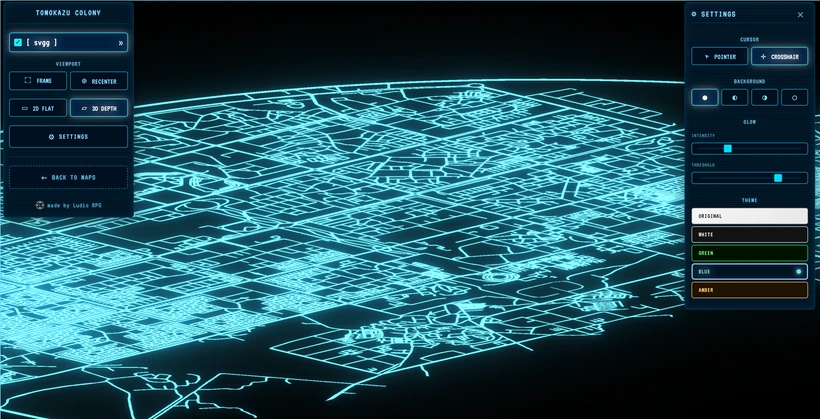
Since the airshaft preview is disabled for now on Novgorod station (more about this below), I added a little bonus instead: the Tomokazu colony map preview. This gorgeous map was fully designed by Mentorian.
The last release came with a big performance boost that lets Field load very large maps, and Tomokazu really tests that, it is huge. There is no verticality on it yet, but the first challenge was simply getting it to load and render in the browser at all.
I do not know what your machine is like, so I am very curious to hear if performance feels decent on your side. For me it runs great. Right now it mostly just looks nice, it is not truly useful for gameplay yet. It still needs features layered on top to turn this big pretty colony into something that actually supports play.
Per-map theme settings (no more accidental sun explosions)
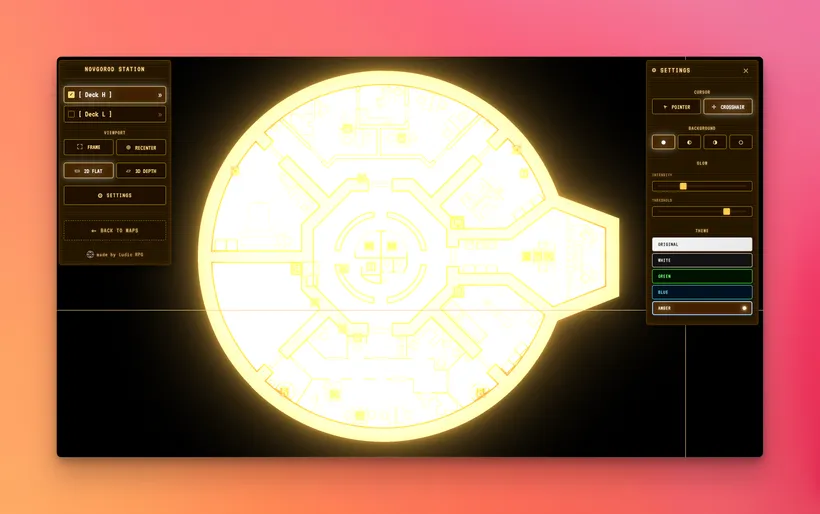
In the last version, if you tried the preview map “Novgorod” and changed the theme, you might have seen something like a giant glowing fireball instead of a nice clean palette.
That happened because glow and color were global settings. Richard’s map was drawn with a very white, Mothership-like palette. When you applied bright color themes on top of that, the result was violent.
Now each map can have its own theme configuration.
- Authors (you or me) can set default colors that make sense for that specific map.
- Global themes still exist, but they respect what the map declares instead of wrecking it.
Result: maps look how they are supposed to look, instead of accidentally going full supernova when you experiment.
Stable mode switching between 2D, 3D, and previews
Previously, switching between 2D view, 3D view or special previews like “navigation ladder 3D preview” was fragile. If you clicked quickly, spammed levels, or tried to jump back and forth in a hurry, the engine could get into a horrible state. Views would freeze, distort, or behave in strange ways. Exiting 3D in particular felt janky, with skewed transitions.
Now: Mode transitions are clean and predictable. The engine will not get stuck in a bad state, no matter how impatiently you click.
Also animations were rebuilt so that moving into and out of 3D feels intentional and solid rather than glitchy.
This is not just “it feels nicer”. This is the foundation that lets me safely add new view modes later, such as airshaft view, overview maps, or other special ways to explore the environment.
Cursor disappearing bug
Sometimes the custom crosshair cursor simply did not show up at all, which meant: no pointer. That is a very stupid bug, but also a very annoying one. It is fixed.
2. Why this invisible work matters for the future of Ludic Field
Remember: Ludic Field is still a side project. I need to make choices that pay off later. This release is one of those choices.
Here is what this refactor unlocks for my roadmap:
Complete airshafts and real vertical gameplay
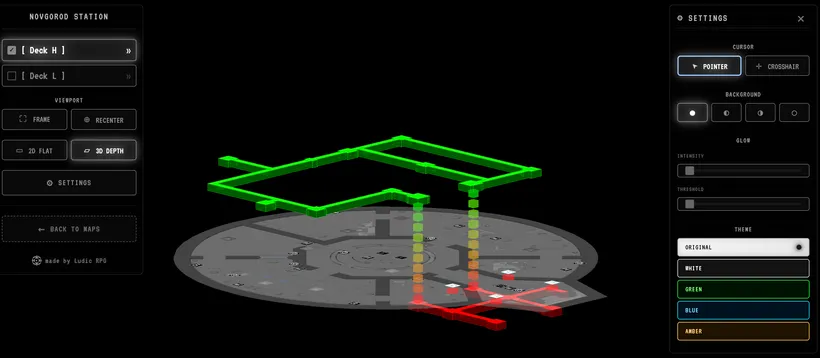
You saw a first prototype of airshafts in the last version. It was a nice preview, with two levels. As soon as we go beyond that, the problems start.
The issue: floors and airshafts were too tightly packed in 3D. If I tried to add more vertical separation, everything would start to collide: floor strokes, floor fills, icons or animated indicators that connect ladders across levels.
All of this was arranged in a fragile way, with different positions in 2D and 3D. Adding more space between levels felt like trying to insert a block in the middle of a Jenga tower that is already leaning.
I am actively working on this right now because verticality is a big part of what makes Ludic Field different. For now the airshaft preview is not available anymore, as I need a bit more work to release it fully.
Remote control: GM view vs player view
At the moment, you control Field with panels and by clicking the map directly. That is fine for solo use. For a table with players, it has a problem.
As a GM, I want to:
- Control what players see.
- Keep controls and tools on my own screen.
That means we need:
- An “admin” view, where the GM has full control.
- A “presentation” view, which the players see, controlled remotely by the GM.
The new architecture is designed with this in mind. I already have some ideas to prototype this quickly, and the cleaner engine makes it realistic to ship without everything collapsing. It is not in this release yet, but the groundwork is there.
Navigation across complex maps
Moving from point A to point B across multiple levels and airshafts can be a fun puzzle. It can also slow the game down if you have to manually trace routes every time.
Internally, this release introduces a proper graph of connections between levels. Think of it as:
Deck A <- [ladder X] -> Deck B
Instead of simple direct connections, there is now a structured graph of how things link.
This open possibilities like:
- Add pathfinding.
- Let the engine figure out “how do I get from here to there” across multiple decks.
- Help the GM or even the players navigate without getting lost in complexity.
The pathfinding itself is still not in this release, but the foundation is in.
Grids that actually mean something
A grid is not just “some squares on top”. It needs to mean something in terms of movement and distance.
That means:
- Each map should know what a “unit of distance” is.
- Is one square a meter? A movement during a turn? Something else?
I do not want Ludic Field to turn into a rigid architectural CAD tool. The goal is:
- Grids that are fast to set up.
- Units that make sense for gameplay instead of building regulations.
- Enough structure that rules like “you can move X units” feel natural and consistent.
Information and interactivity on the map
Ladders are already interactive. You click them, they react, they drive the camera.
In the future, I want you to be able to add more:
- Text labels.
- Visual markers and clues.
- Clickable elements that reveal information or trigger something.
I need to carefully design what is useful for an RPG session and what just clutters the screen. The important part here: the new engine structure is prepared for richer interactive elements instead of limiting everything to ladders and static drawings.
3. Under the hood: the technical overhaul
For those of you who like the nerdy details, here is what changed under the surface.
Full rewrite into TypeScript
The 3D visualization system has been completely rewritten in TypeScript.
- Old code: 8,890 lines.
- New typed code: 9,739 lines.
TypeScript catches many errors before they ever reach you. It also makes the codebase easier to maintain and extend. That matters a lot for a one person side project that aims to grow without collapsing under its own complexity.
Camera-based depth instead of moving floors around
Previously, vertical separation in 3D was created by physically moving floors up and down in 3D space. That sounds simple, but in practice it created a lot of problems:
- Visual glitches when switching modes.
- Floors “jumping” or misaligning.
- Fragile math that made it hard to change anything without breaking something else.
The new approach is:
- Floors keep their original, correct positions.
- The camera moves to different heights or angles to create the sense of depth.
Think of it like this:
- Old way: I was moving the building in front of your eyes.
- New way: flying a drone at different altitudes while the building stays where it is.
The result:
- Mode transitions are smoother and more predictable.
- Whole categories of bugs simply disappear.
- The rendering pipeline is easier to reason about.
Clean mode architecture instead of tangled logic
Before this release, all viewing modes lived inside one large system of more than 1,500 lines, filled with “if we are in this mode then do that” logic.
Now the flow is much clearer:
- The UI triggers an event (you click a floor, a ladder, or a mode button).
- A ModeManager receives that event.
- The currently active mode decides how to react.
- The mode updates the view (camera, visibility, animations).
- The UI gets notified so it can update buttons and indicators.
Each mode (2D, 3D, ladder view, later airshaft view, etc.) is its own module with a clear lifecycle:
entering -> active -> exiting
This makes:
- Bugs easier to track down.
- New modes easier to implement.
What is next
Short version:
- Finish the new airshaft system and vertical connections and re-enable Novgorod station.
- Prototype GM remote control vs player presentation view.
- Start experimenting with grids and map scale metadata.
- Gradually introduce more navigation and interactivity features.
Thank you for your patience while I ship a “boring” release that mostly touches the internals. It is the kind of work that does not make flashy screenshots, but it is what lets Ludic Field grow into something truly powerful and fun at the table.